How to track car expenses
A simple system for tracking car expenses: what to record, which categories to use, how to handle receipts and how to turn it all into monthly totals.

Write down every cost on the day you pay it, with the date, the odometer reading, the amount and a category. That's the habit that makes the rest work. Once the entries exist, monthly totals, cost per mile and a service history for resale come almost for free.
What to record for each expense
- Date and odometer reading. The odometer lets you see costs per distance and when the next service is due.
- Amount, including tax.
- Category, so you can see where the money goes.
- A short note: "front brake pads", "annual insurance", "airport parking".
Skipping the odometer is the most common mistake. Without it a log tells you what you spent but not how hard the car was working for it.
Categories that cover almost everything
Most drivers get by with eight categories: fuel, service and maintenance, repairs, tyres, insurance, car tax and MOT, parking and tolls, and cleaning. Add your own when something recurs, such as a car loan, a charging subscription or a garage rental. Keep the list short enough that choosing one takes a second.
Paper, spreadsheet or app?
A notebook in the glovebox is cheap and never runs out of battery, but nobody adds it up. A spreadsheet adds things up but lives on a computer, not where you are standing when you pay. A phone app sits in between: you enter the cost at the pump or the garage, and the totals are always current.
Whatever you use, make sure you can get your data out. Fuelio exports your fill-ups and costs to a CSV file, so a spreadsheet is always one step away.
Turning the log into decisions
A month of data shows the obvious. A year shows the useful things: that insurance is a bigger share than you thought, that parking near the office costs more than fuel, or that an ageing car has started to need a repair every quarter. Divide the yearly total by the miles you drove and you have a cost per mile you can compare with a lease, a newer car or public transport.
Service entries also answer a question you'll face when selling: "has it been maintained?" A dated list with odometer readings is more convincing than service records with gaps.
How Fuelio handles it
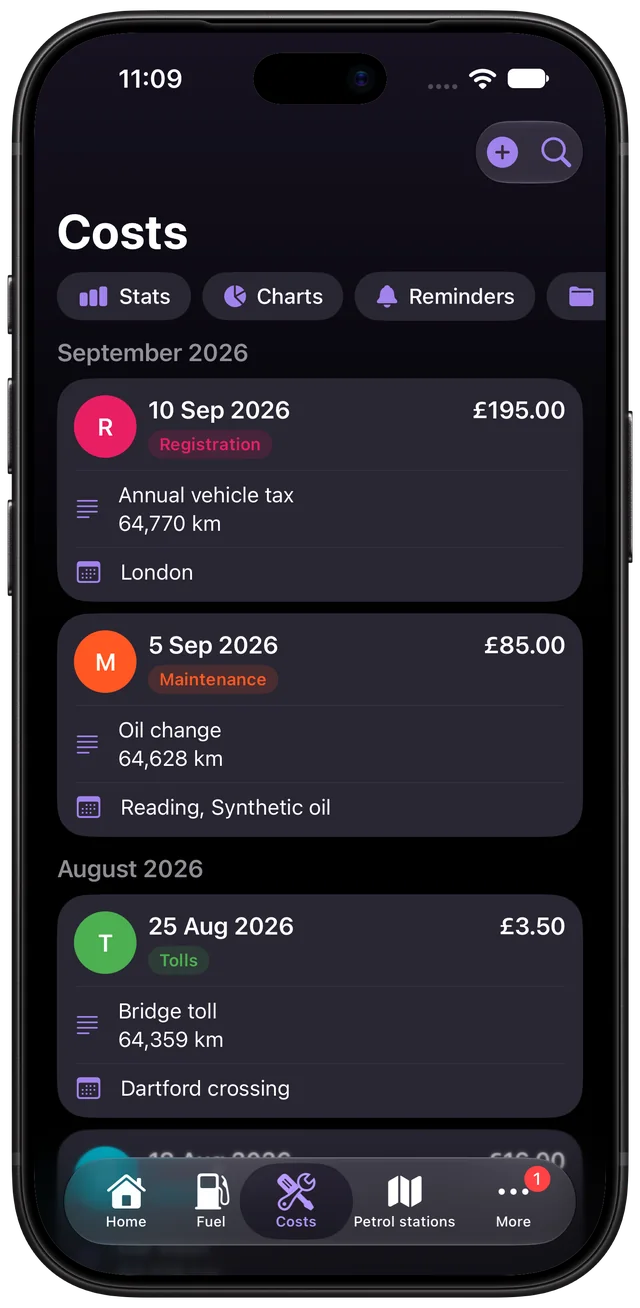
The Cost Log* lets you create as many categories of your own as you like, so you track exactly what you pay for. Charts show your fuel and other costs by month and by category, and the cost stats screen adds totals for this month, this year and each category. Reminders for the next service or renewal are covered in the guide to maintenance reminders. When you sell the car, the Seller's report or a Custom report (a PDF, or text on Android) turns your entries into a service history. In a Custom report you choose which details, including prices, to show.
* On iPhone the Cost Log is part of Fuelio Premium. On Android it is free.
Set up a car expense log
- Choose your categories. Start with fuel, service, repairs, insurance, car tax and MOT, parking and tolls, and cleaning.
- Record every cost when it happens. Write down the date, odometer reading, amount, category and a short note.
- Keep the receipt. Take a photo of paper receipts or file them by month.
- Review once a month. Total each category and compare the month with the previous one.
Questions about this
Which car costs do people usually forget?
Parking, tolls, car washes and small parts like wiper blades or bulbs. Each is minor, but together they often add a few hundred a year. Annual bills such as car tax or the MOT are easy to miss too because they come round only once.
Do I need to keep paper receipts?
For your own budgeting a log entry is enough. Keep receipts for warranty work, insurance claims, business mileage and anything you might want to show a buyer when you sell the car.
Learn more: Cost Log