

Fuelio on CarPlay and Android Auto
Find petrol stations and prices on your car's own screen.
- Apple CarPlay on iPhone
- Android Auto on Android
- Nearby petrol stations as a list or on a map
- Station prices and details on the car's display
- Start and stop trips from the car's display
Available onAndroidiOS
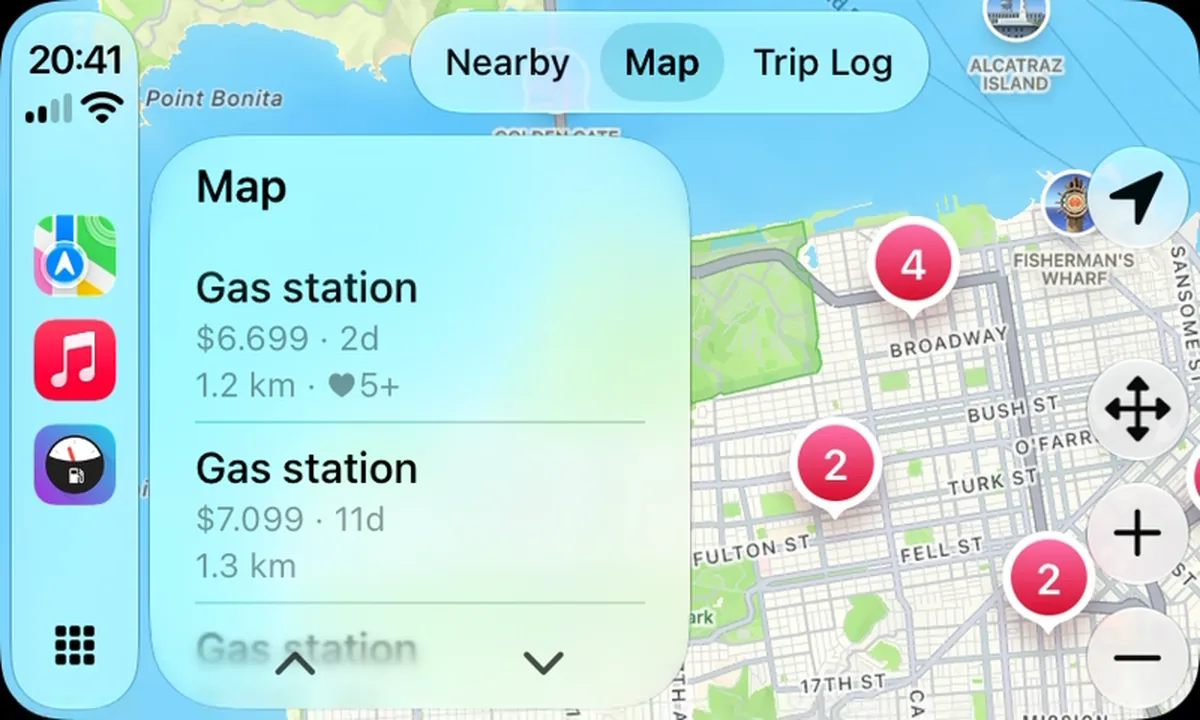
Looking for fuel while driving shouldn't mean picking up your phone. Fuelio works with Apple CarPlay on iPhone and Android Auto on Android, so you can find petrol stations right on your car's own screen.
Nearby stations, map and details
See the petrol stations around you as a list or on a map, and open a station to check its price and details before you decide where to fill up. The layout follows each system's rules for in-car apps, so it's big, simple and safe to glance at.
More than finding fuel
On CarPlay, the Trip Log tab lets you start and stop recording a trip from the car's screen. Android Auto does the same, and also lets you add a fill-up with a simplified form (Fuelio detects the station for you) and look at your fuel log, cost log and reminders. You can search by city or address too.
Why it helps
Fuel prices change from street to street, and the cheapest station is often one you'd pass anyway. With prices on the car's screen you can choose before you pull off the road, instead of guessing or searching on the phone at a red light. The guide on finding cheaper fuel shows when a detour is worth it.
Where do the prices come from? Some countries publish official station prices; elsewhere they come from other Fuelio drivers. How fuel prices work.


