How to find cheaper gas prices near you
Find cheaper gas without wasting the savings on detours: compare gas prices on a map, know your area average and fill up where you already drive.
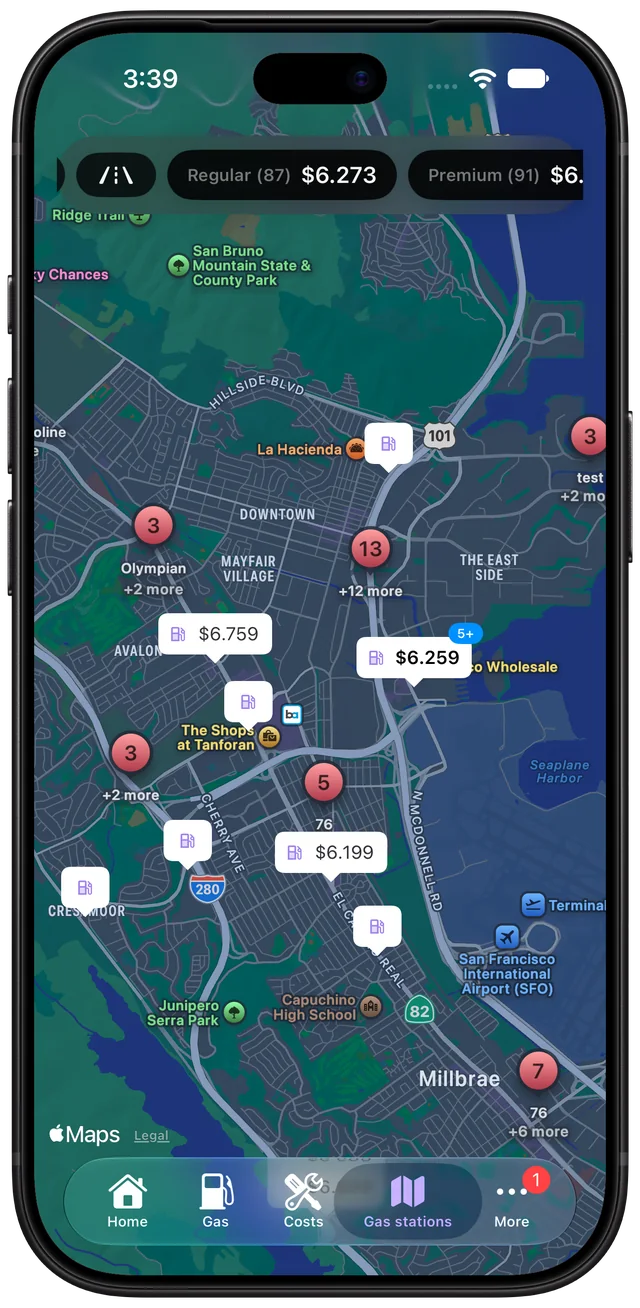
Check prices before you set off, not when the warning light comes on. With a map of station prices you can pick the cheaper one on a route you were driving anyway. The saving on a single tank is usually a few dollars, and it disappears if you detour too far, so the trick is to compare stations you already pass.
Is the detour worth it?
A quick calculation stops you chasing a few cents across town. Say a station 3 miles away (6 miles there and back) is 10 cents a gallon cheaper and you need 12 gallons:
- Saving: 12 × $0.10 = $1.20
- Detour fuel at 27 MPG and $3.40: 6 ÷ 27 × 3.40 = $0.76
You'd come out 44 cents ahead and lose ten minutes. For a bigger difference or a bigger tank it pays; for a few cents it doesn't. Knowing your own consumption (how to calculate MPG) makes this an easy sum.
Know what "cheap" means in your area
A price looks low or high only against the local average. Prices vary from neighbourhood to neighbourhood, and stations on highways or next to busy junctions often charge more than those a few streets away. If you know the area average for your fuel type, you can tell a good price at a glance.
Price isn't the only thing that matters
The cheapest station isn't always the best one. A slightly dearer station that is well run, easy to get in and out of, and open when you need it can be worth the extra cents. Fuelio shows what other drivers think: you can see which stations are the most popular (visited by the most Fuelio drivers) and which are top rated (the likes drivers give them), and station pages show services where they are known, such as a car wash or a shop. Look at the price, then check the likes before you commit to the detour.
Where the prices come from
Gas price apps get their data in two ways. Some countries publish official prices that stations must report, and apps can show those directly. Elsewhere, prices come from drivers who update them after filling up. Crowdsourced coverage is excellent in busy areas and thin in quiet ones, so check when a price was last reported.
Fuelio uses both. Where official data exists (for example, in Germany and Italy), it's shown; everywhere else, prices come from other Fuelio users, and you can add the price you paid when you log your fill-up. How gas prices work in Fuelio.
Spend less on fuel overall
The station is only one lever. Your driving matters as much:
- Keep tires at the right pressure. Under-inflated tires increase rolling resistance.
- Remove roof boxes and racks when you don't need them.
- Drive smoothly. Hard acceleration and late braking waste fuel.
- Watch your consumption. A sudden drop in MPG can point to a problem worth checking.
Tracking every fill-up shows whether any of this works for your car, and turns guesses into figures you can see over months.
Finding stations in Fuelio
The map shows stations with prices, and with nearby stations turned on, the dashboard highlights the best-priced, top-rated and nearest stations plus the average gas prices in your area. One-tap filters on the map show stations updated today, top rated and most popular. You can also filter by fuel type or station name and keep your favorites in their own tab. Nearby stations and prices also appear on your car's screen, in CarPlay on iPhone and in Android Auto on Android. Planning a long drive? See how to estimate the fuel cost of a trip.
Questions about this
How current are gas prices in apps?
It depends on the source. Official feeds in some countries update often, while crowdsourced prices are only as fresh as the last driver's report. Check the date shown next to a price before driving across town for it.
Is premium fuel worth paying for?
Only if your owner's manual requires it. Most cars designed for regular fuel gain nothing measurable from premium, so the extra cost per gallon is simply more money spent.
Learn more: Gas Prices